
161Views
How can I invest using the One Click Invest / Invest More section?
Investing through this section is quick and easy. Just follow these steps:
<AH> Step 1 : Search for your desired mutual fund in the Mutual Fund section. </AH> <AB>![Sandeep 1.jpg]()
</AB> <AH> Step 2 : Enter the investment amount, choose One-Time or SIP, and select a SIP date (first installment is deducted today; the chosen date is for the second one). </AH> <AB>![Media (10).jpg]()
</AB> <AH> Step 3 : Complete the payment using UPI or Net Banking. </AH> <AB>![Sandeep 5.jpg]()
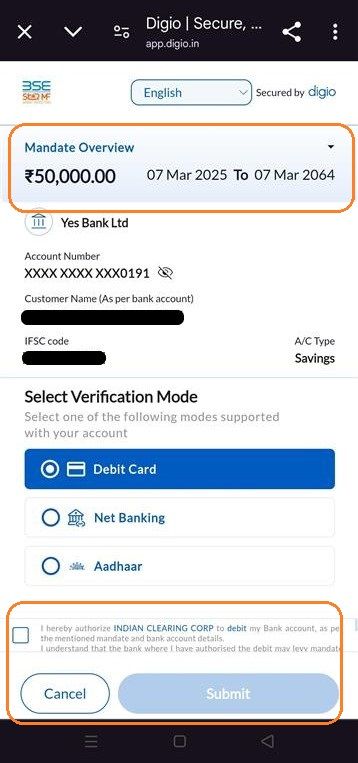
</AB> <AH> Step 4 : For SIPs: If you don’t have an active auto-debit mandate, you’ll be asked to set one up. </AH> <AB>![Sandeep 6.jpg]()
</AB> <AH> Step 5 : Confirmation on payment done. </AH> <AB>
Your order is confirmed (if placed before 2:30 PM; otherwise, it's processed the next business day).
Units are allocated within T+2 days after payment confirmation from the fund house (AMC).
![Sandeep 7.jpg]()
</AB>
<AH> Step 1 : Search for your desired mutual fund in the Mutual Fund section. </AH> <AB>
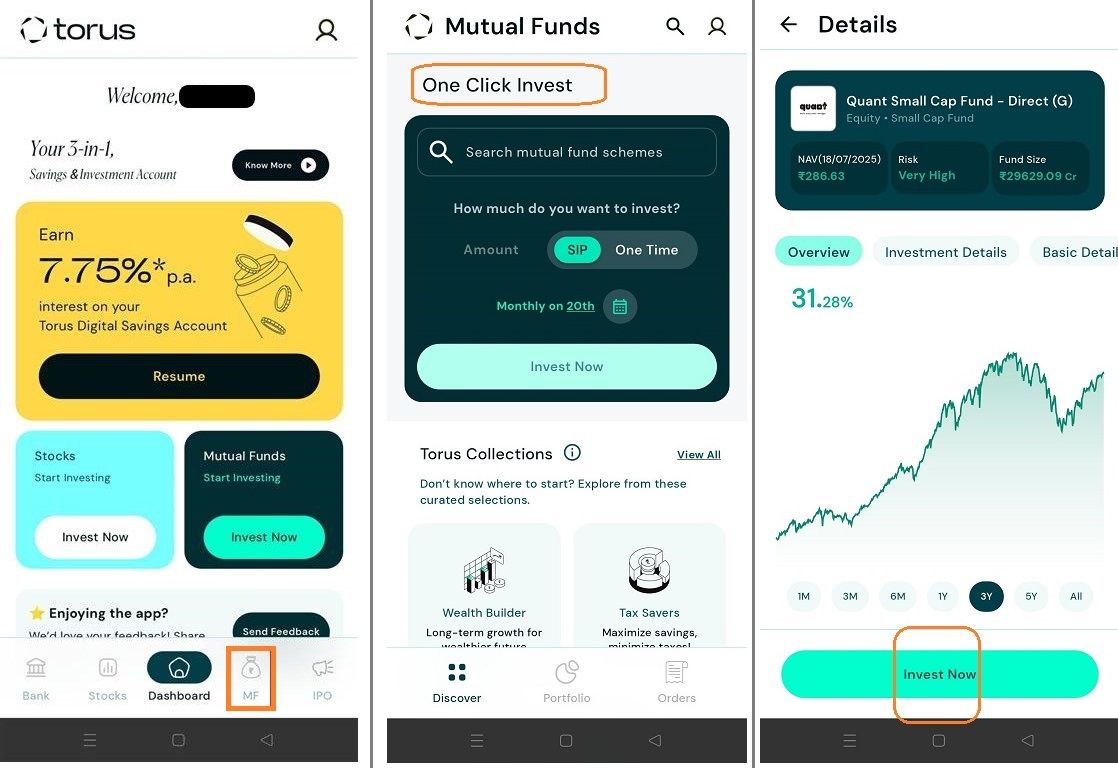
</AB> <AH> Step 2 : Enter the investment amount, choose One-Time or SIP, and select a SIP date (first installment is deducted today; the chosen date is for the second one). </AH> <AB>
.jpg)
</AB> <AH> Step 3 : Complete the payment using UPI or Net Banking. </AH> <AB>
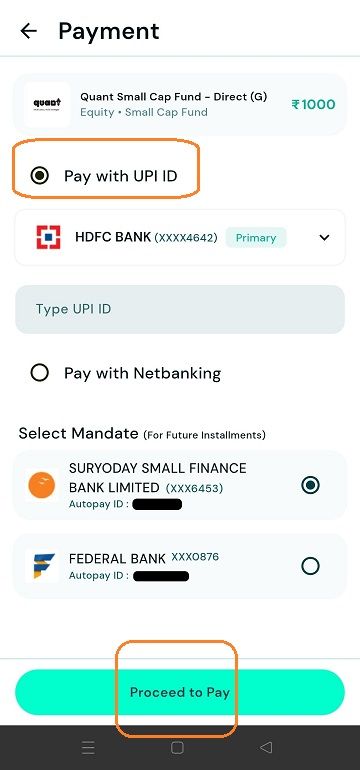
</AB> <AH> Step 4 : For SIPs: If you don’t have an active auto-debit mandate, you’ll be asked to set one up. </AH> <AB>

</AB> <AH> Step 5 : Confirmation on payment done. </AH> <AB>
Your order is confirmed (if placed before 2:30 PM; otherwise, it's processed the next business day).
Units are allocated within T+2 days after payment confirmation from the fund house (AMC).
</AB>
Last updated: 5 Months Ago


161Views
Mutual Fund
 How to Invest in Mutual funds through Torus?
- What are the Investment Options Available in Torus for Mutual Funds?
- How can I redeem my Mutual Fund holdings on Torus?
- How can I cancel an ongoing SIP?
- Post SIP Registration where can I see my active SIP in torus?
- Can I use ledger balance to pay for my SIPs or Mutual Funds orders?
- What are the Charges for Investing in Mutual Funds through Torus?
- What happens if I miss an SIP instalment payment?
- Where can I view my MF orders?
- How do I set up AutoPay/Mandate for automatic deduction of future SIP instalments?


