
561Views
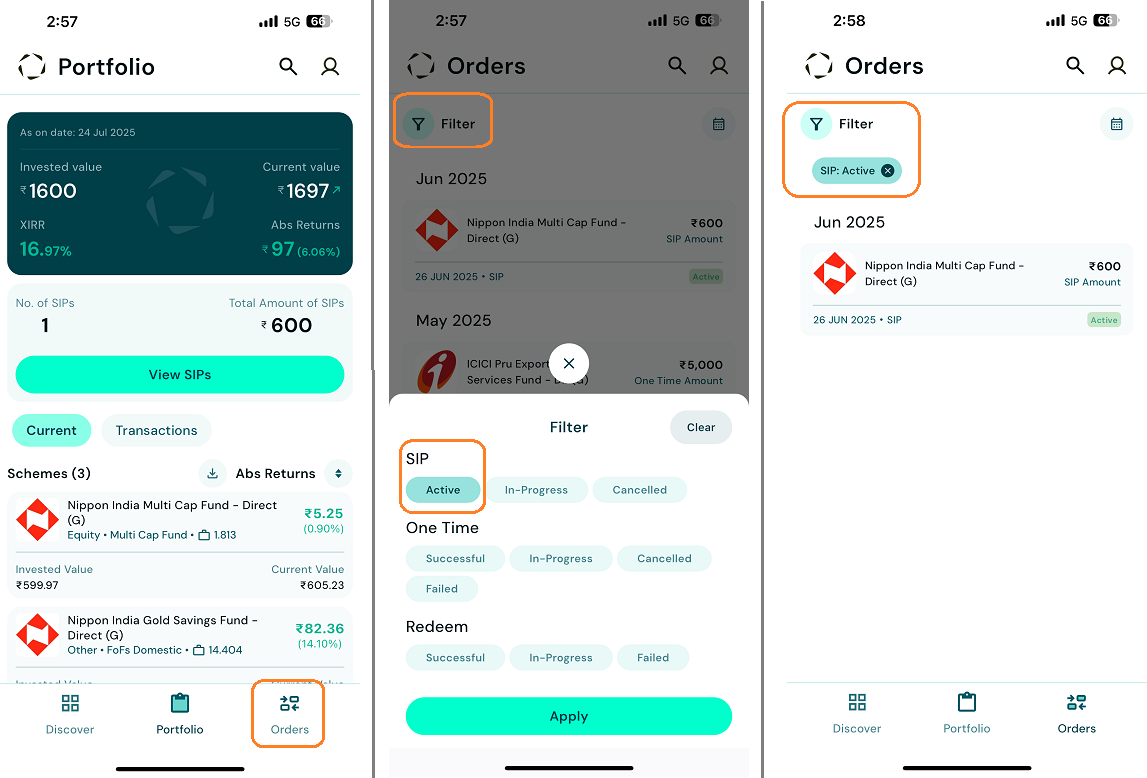
Post SIP Registration where can I see my active SIP in torus?
To view your active SIPs in Torus:
This helps you easily track your ongoing SIP investments.
![Active SIP-1.png]()
- Navigate to the " Orders " section under Mutual Funds (MF).
- Apply the " Active " filter for SIPs.
- You'll see a list of all SIPs with an active status.
This helps you easily track your ongoing SIP investments.
Last updated: 12 Months Ago


561Views
Mutual Fund
 How to Invest in Mutual funds through Torus?
- What are the Investment Options Available in Torus for Mutual Funds?
- How can I redeem my Mutual Fund holdings on Torus?
- How can I cancel an ongoing SIP?
- Can I use ledger balance to pay for my SIPs or Mutual Funds orders?
- What are the Charges for Investing in Mutual Funds through Torus?
- What happens if I miss an SIP instalment payment?
- Where can I view my MF orders?
- How do I set up AutoPay/Mandate for automatic deduction of future SIP instalments?


