
450Views
How do I reset my debit card PIN through the app?
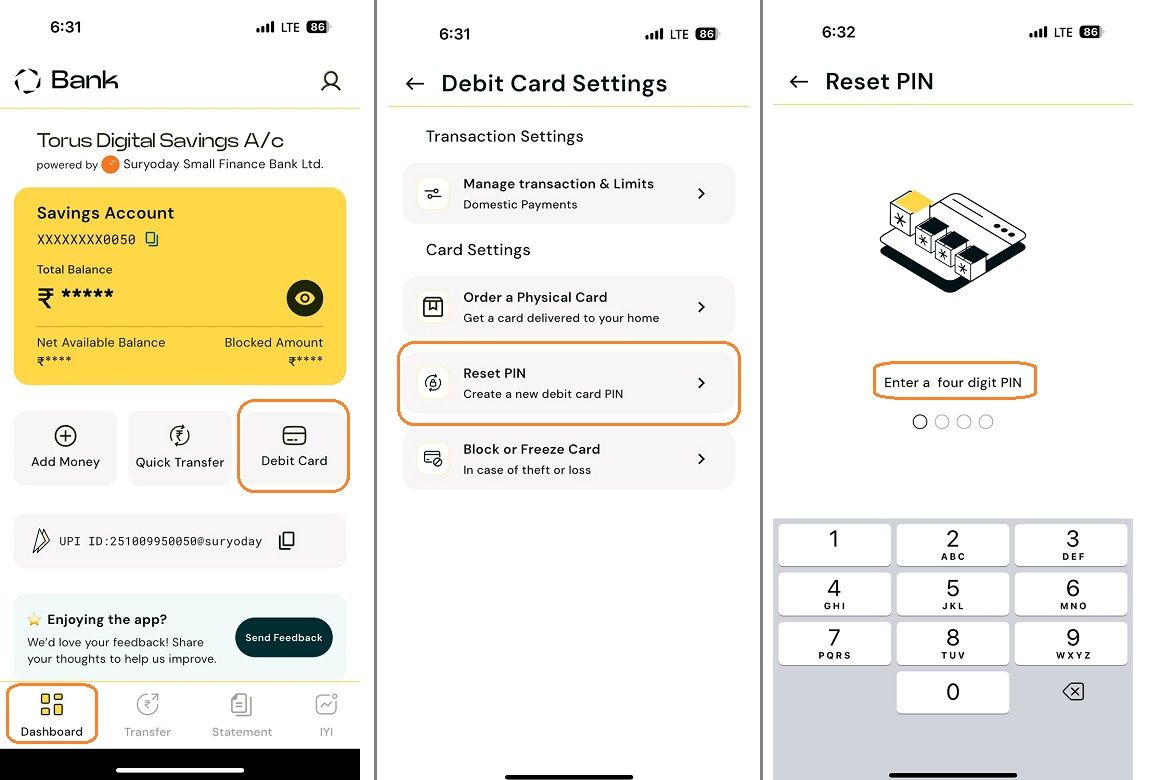
To reset your debit card PIN, please follow the steps outlined below:
Once you complete these steps, an OTP (One-Time Password) will be sent to your registered mobile number by Suryoday Small Finance Bank . You will need to enter this OTP to confirm and complete the PIN reset process.
![reset debit card pin 2.jpg]()
Related question
What should I do if I don’t receive an OTP while resetting my debit card PIN?
- Log in to our app and access your Banking Dashboard.
- Navigate to the 'Debit Card' section.
- Click on the 'Card Settings' option.
- Select 'Reset PIN' from the available options.
- Enter your new four-digit PIN as desired.
Once you complete these steps, an OTP (One-Time Password) will be sent to your registered mobile number by Suryoday Small Finance Bank . You will need to enter this OTP to confirm and complete the PIN reset process.
Related question
What should I do if I don’t receive an OTP while resetting my debit card PIN?
Last updated: 10 Months Ago


450Views
Banking
 Will I be able to access SSFB Netbanking, SSFB App and services?
- What are the different methods for adding funds to my Bank account?
- My existing account with SSFB has a minimum balance criteria. Will I get the benefit of zero balance if I link it to Torus?
- How will I be informed about the account opening & what documents will I receive?
- Can I opt for the 3 in 1 account benefit if I already have an existing Torus account?
- I already have a SSFB bank account. Can I add it in the Torus app?
- What documents are required to open a Torus 3-in-1 account?
- What is Torus 3-in-1 account & what are the benefits?
- How long does it take to open a 3 in 1 account?
- What are the charges for opening a 3 in 1 account and minimum balance required in the bank?


