
398Views
Where can I view my statements or transaction history ?
Be updated with your balances and transaction history at your fingertips. You can generate & get statements for any period required by you on your registered email address and WhatsApp.
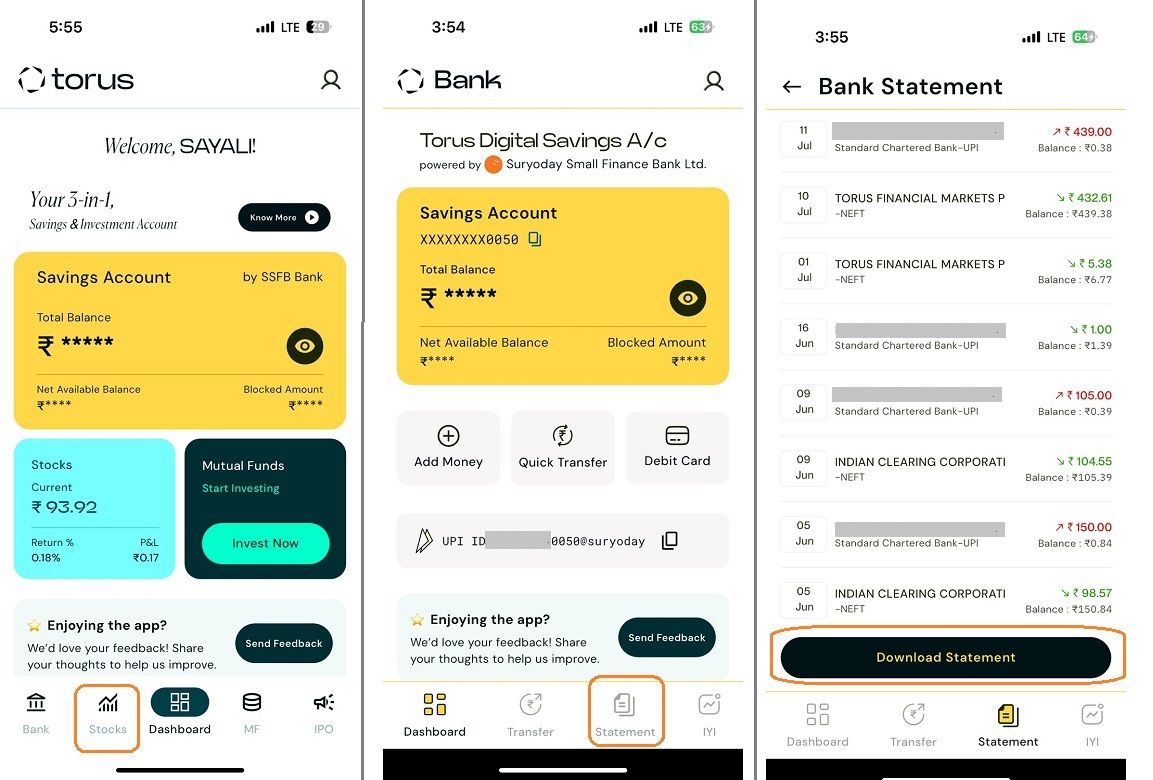
Here’s how you can generate the statements:
![download statement 1-1.jpg]()
Related question
How do I check my account balance and recent transactions?
Here’s how you can generate the statements:
- Select the tab of ‘Statements’ from the bottom navigation tray. You will be able to view the last 10 transactions.
- If you need the statement for a customized period, you can Click on the ‘Select Date’ option and either select any of the available options or choose the period required by you.
- Click on Download Statement. A message will be displayed informing that the statement has been sent to your registered email address and WhatsApp number. Statement will be sent to you on whatsapp and registered email id mentioned in bank records.
Related question
How do I check my account balance and recent transactions?
Last updated: 12 Months Ago


398Views
Banking
 Will I be able to access SSFB Netbanking, SSFB App and services?
- What are the different methods for adding funds to my Bank account?
- My existing account with SSFB has a minimum balance criteria. Will I get the benefit of zero balance if I link it to Torus?
- How will I be informed about the account opening & what documents will I receive?
- Can I opt for the 3 in 1 account benefit if I already have an existing Torus account?
- I already have a SSFB bank account. Can I add it in the Torus app?
- What documents are required to open a Torus 3-in-1 account?
- What is Torus 3-in-1 account & what are the benefits?
- How long does it take to open a 3 in 1 account?
- What are the charges for opening a 3 in 1 account and minimum balance required in the bank?


