
927Views
How to add Beneficiary? How long does it take to add beneficiary and what is the limit to transfer funds?
Adding Beneficiary is extremely simple and quick. All you need to do is:
![add payee 2-1.jpg]()
![add payee 5-1.jpg]()
Alternatively, you can select the option of ‘Quick Transfer’ if the transaction is a one-time transfer. Follow the above steps till step 4 and complete by following the below additional steps:
Kindly note in Quick Transfer, the funds will be transferred to the designated bank account number irrespective of the Payee Name. Hence, ensure to enter the bank account number carefully.
Kindly note the limit on the fund transfer applicable once the Payee is successfully added:
- First 24 hours -> Rs. 50,000
- After 24 hours -> Rs. 1,00,00,000
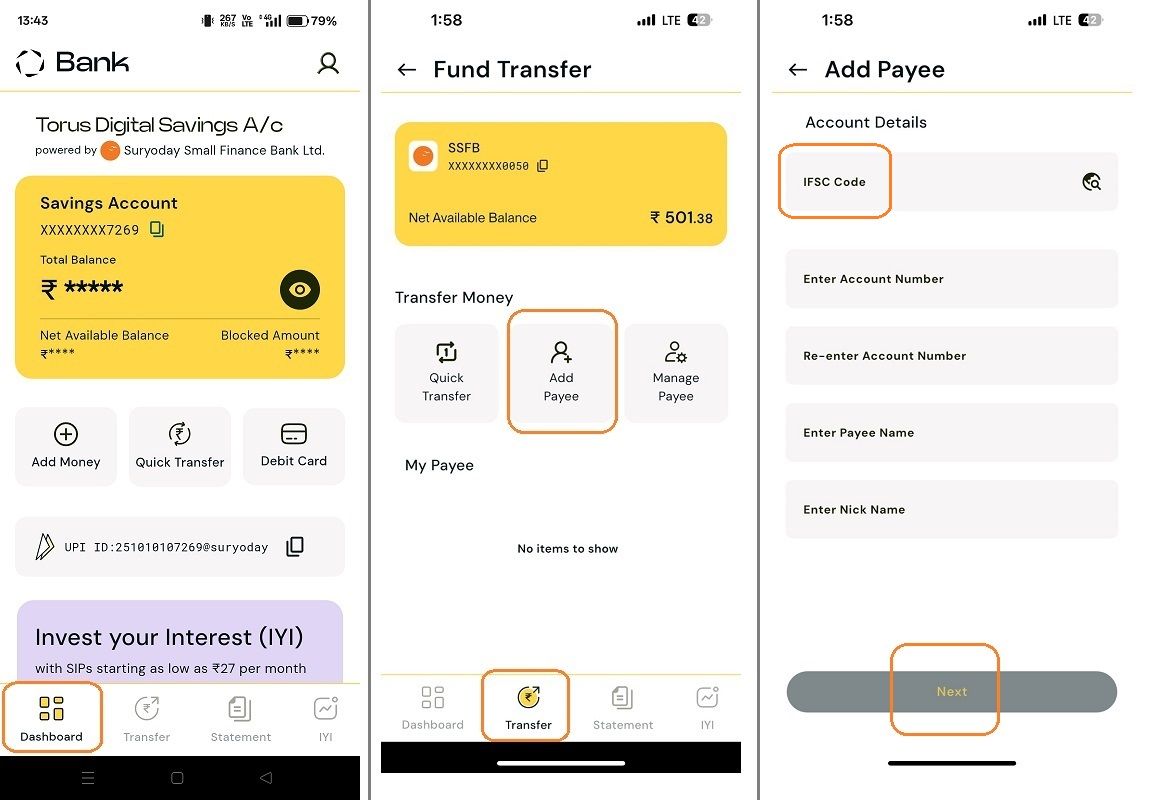
- Select the tab of ‘Transfer’ from the bottom navigation tray of the Dashboard
- Select ‘Add Payee’
- Enter the Payee details like IFSC code, Account Number, Payee Name & Nick Name
- Select ‘Next’ and Review the Details.
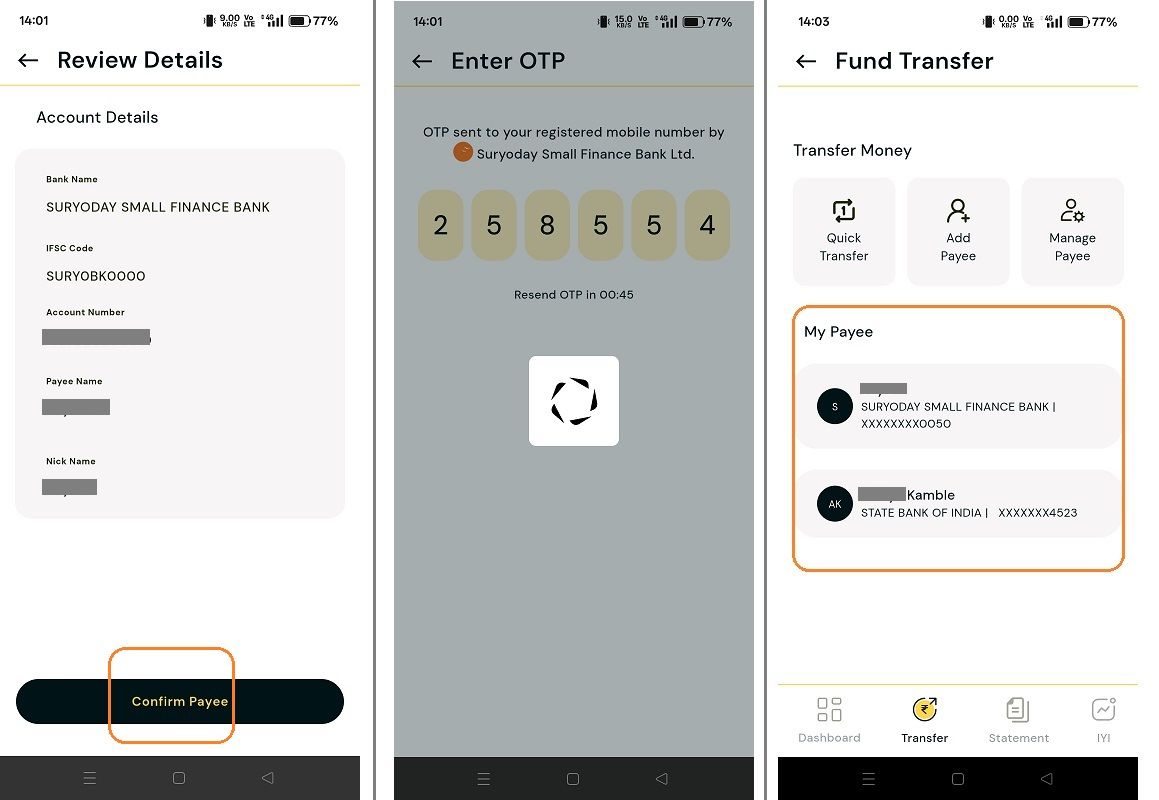
- If the details are found to be correct, then click on ‘Confirm Payee’
- You will receive an OTP from SSFB to authenticate the Payee.
- Once the OTP is entered & verified, the Payee is added successfully.
Alternatively, you can select the option of ‘Quick Transfer’ if the transaction is a one-time transfer. Follow the above steps till step 4 and complete by following the below additional steps:
- Click ‘Proceed to Pay’ on the Review Details page
- Enter the amount, select the mode of payment (IMPS, NEFT or RTGS) and click on Pay
- Enter the OTP & verify. That’s all, your funds are transferred to the mentioned bank account number.
Kindly note in Quick Transfer, the funds will be transferred to the designated bank account number irrespective of the Payee Name. Hence, ensure to enter the bank account number carefully.
Kindly note the limit on the fund transfer applicable once the Payee is successfully added:
- First 24 hours -> Rs. 50,000
- After 24 hours -> Rs. 1,00,00,000
Last updated: 10 Months Ago


927Views
Banking
 Will I be able to access SSFB Netbanking, SSFB App and services?
- What are the different methods for adding funds to my Bank account?
- My existing account with SSFB has a minimum balance criteria. Will I get the benefit of zero balance if I link it to Torus?
- How will I be informed about the account opening & what documents will I receive?
- Can I opt for the 3 in 1 account benefit if I already have an existing Torus account?
- I already have a SSFB bank account. Can I add it in the Torus app?
- What documents are required to open a Torus 3-in-1 account?
- What is Torus 3-in-1 account & what are the benefits?
- How long does it take to open a 3 in 1 account?
- What are the charges for opening a 3 in 1 account and minimum balance required in the bank?


