
5kViews
How to transfer shares from NSDL to CDSL online?
You can transfer the shares from NSDL to CDSL by using the online Speed-e facility .
What is Speed E?
There are two ways to register for a Speed-e account:
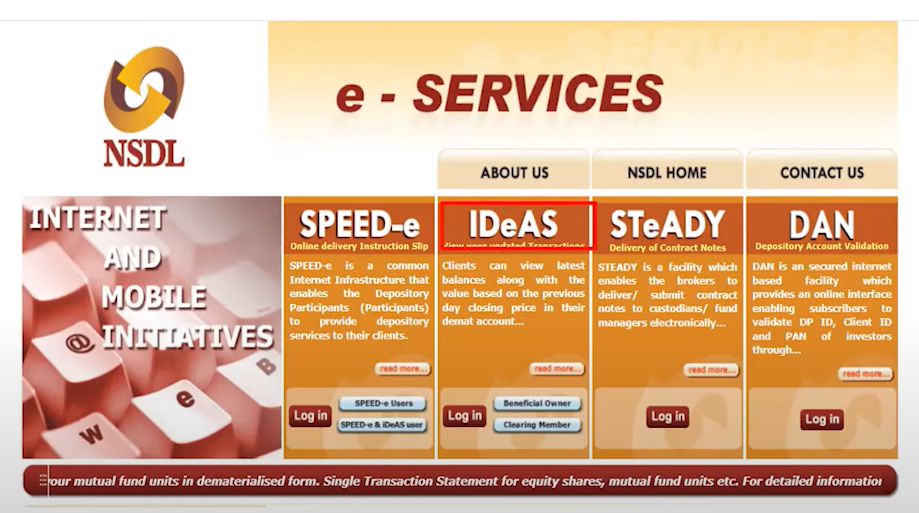
Before using the Speed-e facility, you need to create an IDeAS account. To do so, visit the IDeAS section on the NSDL website.
IDeAS (Internet-based Demat Account Statement):
![1-1.png]()
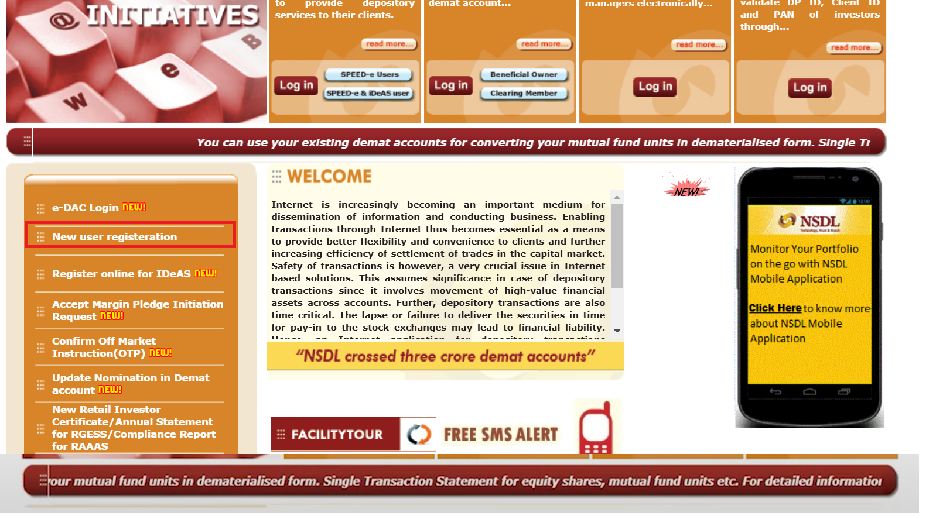
Step 2 - Click on “New user registration” tab.
![2_pixel 919-1.png]() Step 3 - Click on “New user registration” tab.
Step 3 - Click on “New user registration” tab.
![3-1.png]()
Step 4 - Click on “REGISTER”
![4.png]() After clicking on “REGISTER” following registration page will open.
After clicking on “REGISTER” following registration page will open.
![5.png]()
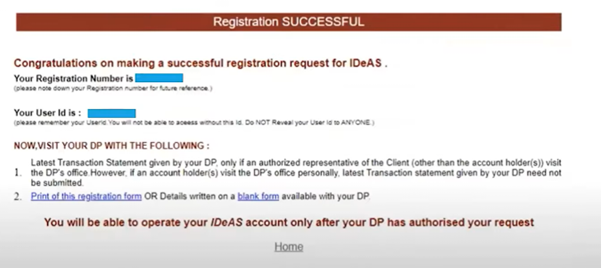
You will then see a "Registration Successful" confirmation window.
![6.png]() Fill the Details of the other broker where you have to transfer shares – Here, fill in the details of the other broker to whom you want to transfer the shares. This information will be required later, specifically in the CM BP ID box , for the share transfer process.
Fill the Details of the other broker where you have to transfer shares – Here, fill in the details of the other broker to whom you want to transfer the shares. This information will be required later, specifically in the CM BP ID box , for the share transfer process.
</AB>
How to register for a Speed-e account through a Smart Card.
You need to register for Smart card-based access to Speed-e to procure a digital signature certificate (DSC) to submit an on-market or off-market inter-depository transaction of your choice.
<AH> How to transfer shares using SPEED E facility.
</AH> <AB> 1. Log in to Speed-E using the user ID and password created via the Smart Card or password method.
![8.png]()
2. After logging in, the dashboard will appear on the screen. Then, click on the "Submit" option under "Delivery Instructions.![9.png]()
3. Once you select the "Submit" option, the next dashboard will open. Fill in the required details.
![10.png]() 4. Afterward, click on the "Views" option under "Delivery Instructions," where all the details of the shares to be transferred will appear.
4. Afterward, click on the "Views" option under "Delivery Instructions," where all the details of the shares to be transferred will appear.
![11.png]()
Then, click "Submit." After this share will be transferred on the basis of execution date. </AB>
What is Speed E?
- Speed E is an internet-based platform that enables shareholders to perform online transactions. It offers all the features of IDeAS, plus the ability to carry out transactions.
- Investors can transfer shares between Demat accounts and perform other related transactions.
- This service is similar to the Easiest facility provided by CDSL .
There are two ways to register for a Speed-e account:
- By using a password
- Through a Smart Card
Before using the Speed-e facility, you need to create an IDeAS account. To do so, visit the IDeAS section on the NSDL website.
IDeAS (Internet-based Demat Account Statement):
- IDeAS allow clients to view the securities held in their Demat account, along with their approximate market value.
- It provides investors with a comprehensive overview and summary of the shares held in their name or under their PAN.
- This service is similar to the EASI facility offered by CDSL.
Step 2 - Click on “New user registration” tab.
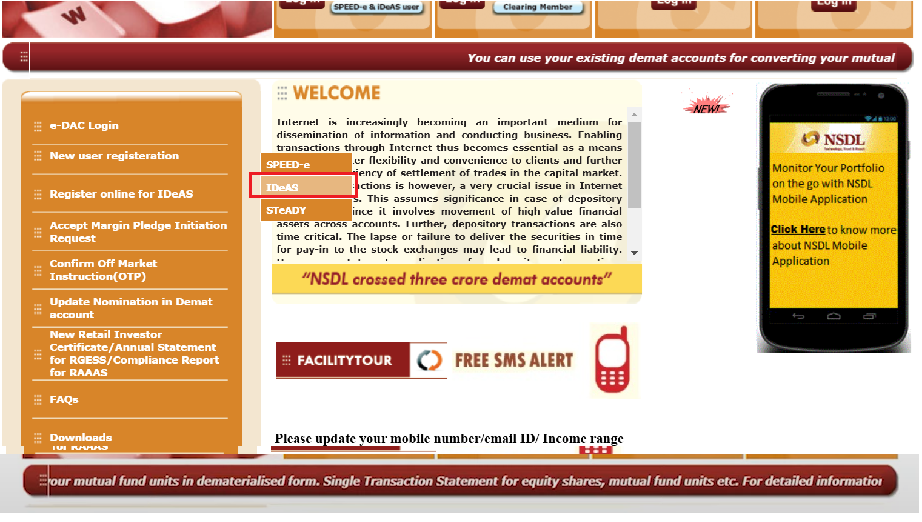
Step 4 - Click on “REGISTER”
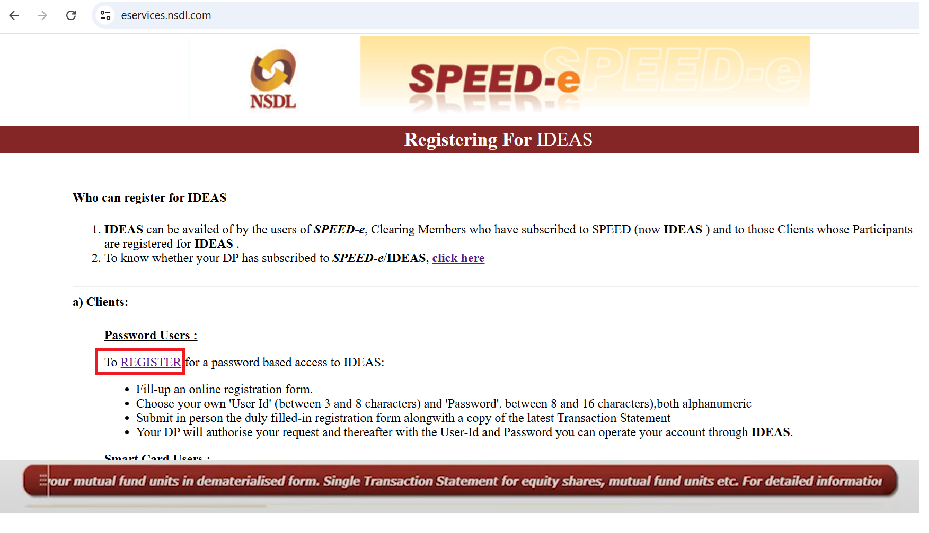
- Enter your preferred user ID.
- Provide your full name and date of birth.
- Choose the EDeAS facility from the options.
- Once all the details are filled in, click on "Submit."

You will then see a "Registration Successful" confirmation window.
</AB>
How to register for a Speed-e account through a Smart Card.
You need to register for Smart card-based access to Speed-e to procure a digital signature certificate (DSC) to submit an on-market or off-market inter-depository transaction of your choice.
- Download and fill the SPEED-e Application Form , Power of Attorney or obtain it directly from your DP.
- Fill in all the required details.
- Submit the duly filled-in form with the requisite documents to your DP.
- DP will verify the details and then assign a User-Id that can help procure a Smart Card Kit, Digital Signature Certificate (DSC), and Personal Identification Number (PIN).
- Install the Smart Card Kit on the computer along with the User-Id, DSC, and PIN for using SPEED E facility.
- You can transfer the securities to the desired beneficiary using the inter-depository module. Note : The Speed-e facility is available to users only when their DP has subscribed to the Speed-e facility.
<AH> How to transfer shares using SPEED E facility.
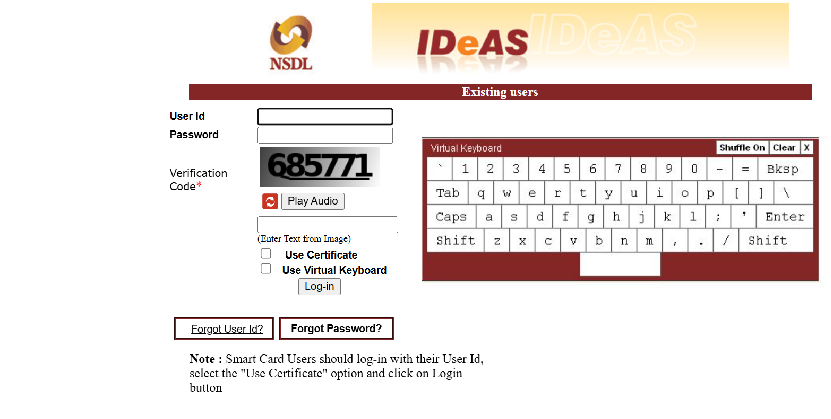
</AH> <AB> 1. Log in to Speed-E using the user ID and password created via the Smart Card or password method.
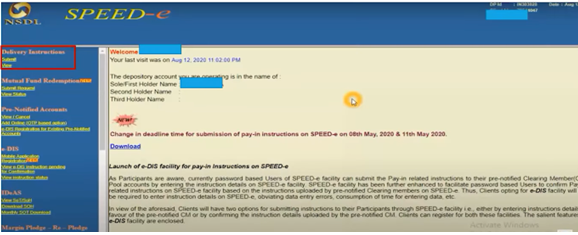
2. After logging in, the dashboard will appear on the screen. Then, click on the "Submit" option under "Delivery Instructions.
3. Once you select the "Submit" option, the next dashboard will open. Fill in the required details.
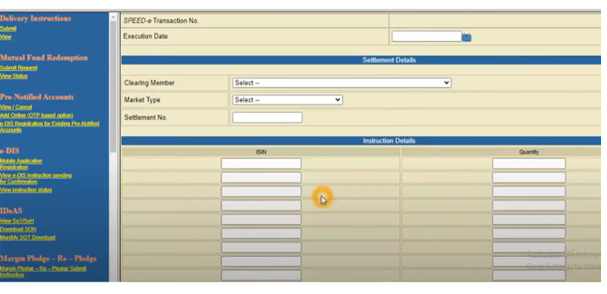
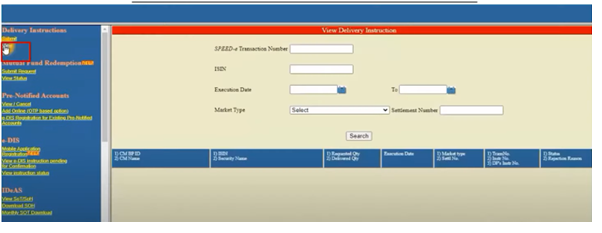
Then, click "Submit." After this share will be transferred on the basis of execution date. </AB>
Last updated: 10 Months Ago


5kViews
Stocks
 How to transfer shares from other DP to Torus DP
- How to place buy or sell order?
- How to modify order?
- How much leverage is provided for Intraday orders?
- How can I convert my order from Intraday to Delivery?
- How to create a Watchlist?
- Why has the order placed not executed?
- Can I place AMO Orders in Intraday?
- What happens if I don't square off my intraday positions ?
- Can I place Intraday Orders in pre-open session?


