
410Views
How to place trades through ChartXpress ?
Example: Buy 6 lots of 21500 CE for Intraday.
Steps:
1. Tap on 21500 on the Y-axis (strike price axis).
![Slide2 (1).jpg]()
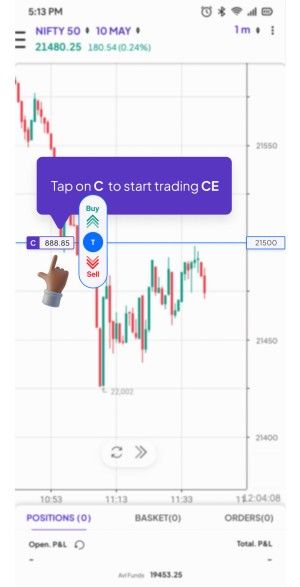
2. Tap C to select Call Option.
![Slide3.jpg]()
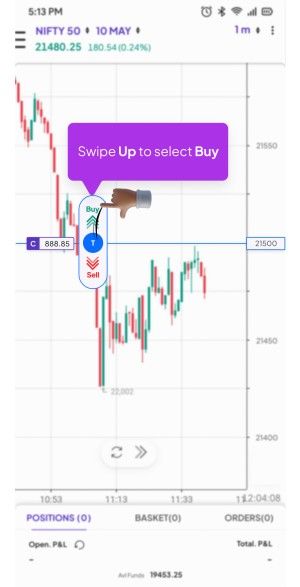
3. On the central strike preview area, swipe up to initiate a Buy order.
![Slide4.jpg]()
4. On the bottom order form:
![Slide5.jpg]()
![Slide6.jpg]()
5. Once confirmed, swipe to buy on the order slider at the bottom.
![Slide7.jpg]()
👉 Swipes are used to reduce taps and speed up execution.
Steps:
1. Tap on 21500 on the Y-axis (strike price axis).
.jpg)
2. Tap C to select Call Option.
3. On the central strike preview area, swipe up to initiate a Buy order.
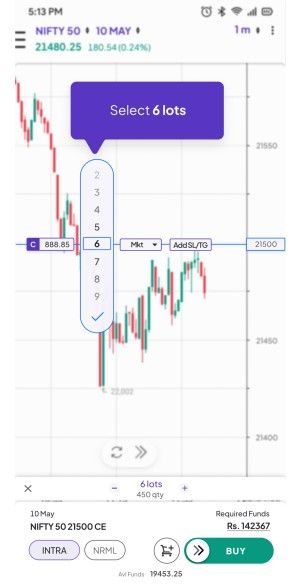
4. On the bottom order form:
- Tap the quantity box to select 6 lots from the dropdown.
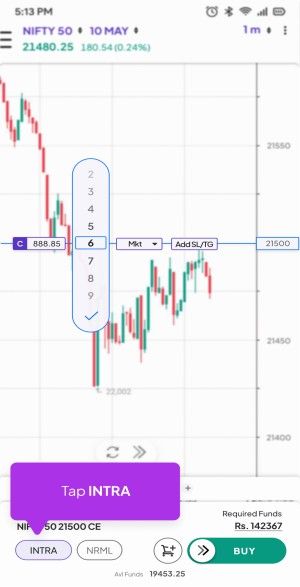
- Tap on the "Delivery" / "Intraday" toggle and select Intraday.
5. Once confirmed, swipe to buy on the order slider at the bottom.
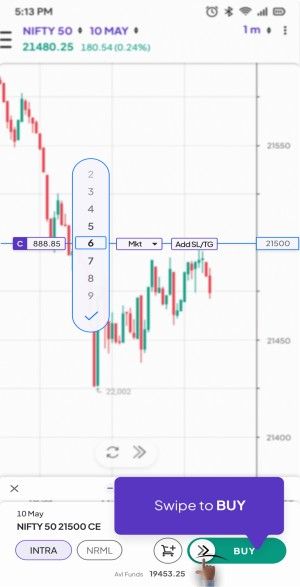
👉 Swipes are used to reduce taps and speed up execution.
Last updated: 4 Months Ago


410Views
 How to Exit Positions?


